DITA-OT Industry insights

The long and winding roads from DITA to PDF

by Sheila Loring

DITA XML is of little use to readers unless it’s converted to some kind of output. The DITA Open Toolkit (DITA OT) provides transforms and scripts that convert DITA to PDF output and a long list of other formats.

Producing PDF output from DITA content can be challenging. DITA XML is converted to an XSL-FO file, a combination of content and formatting instructions. You must know XSL-FO to customize the PDF, even just to add simple content such as headers and footers, logos, and so on.

To forgo the programming, you can choose a page layout or help authoring tool, but these tools also have pitfalls. Page layout programs have varying degrees of DITA support. Help authoring tools let you style the PDF through CSS, but you can’t fine-tune page layout as you can in page layout programs.

These are just a few examples we discuss in our white paper “Creating PDF files from DITA content.” Read the white paper online (in HTML or PDF).

Read More
Webinar

New Webinar Series: Things to consider when moving to DITA

Scriptorium and JustSystems are announcing a three-webinar series on preparing to use DITA.

The first two webinars in the series describe the age-old problem of converting legacy content into DITA. Because a great deal of unstructured content is in either Adobe FrameMaker and Microsoft Word, we’re dedicating one webinar to converting Unstructured FrameMaker to DITA and the other to converting Microsoft Word to DITA.

The third webinar describes various re-use strategies you can apply to your DITA content.

The dates and times for the conversion webinars are:

  • Converting Unstructured FrameMaker to DITA – August 25, 2:00pm Eastern time.
  • Converting Microsoft Word to DITA – September 1, 2:00pm Eastern time.

The date and time for the third webinar (DITA reuse strategies) will be announced toward the end of August.

All of the webinars in the series are free, but you do have to register before attending. To sign up, follow this link to the JustSystems web site:

http://na.justsystems.com/webinars.php

Register now!

Read More
Webinar

Learn DITA and XML at your desk

For August and September, our webinar schedule is as follows:
DITA 101, August 18 at 11 a.m. Eastern time
Participants will learn about basic Darwin Information Typing Architecture (DITA) concepts, the business case for implementing DITA, and some typical uses of DITA. This webinar is ideal for those who are considering a move to structured authoring based on the DITA standard. Register
Demystifying DITA to PDF Publishing, September 10 at 11 a.m. Eastern time
When a company implements a DITA-based workflow, the most difficult technical obstacle is often setting up a PDF/print publishing workflow. This session discusses the advantages and disadvantages of using the DITA Open Toolkit, FrameMaker, InDesign, and other options to create PDF output from DITA content. Basic familiarity with DITA, Extensible Markup Language (XML), and related technologies is helpful but not required. Register
What Do Movable Type and XML Have in Common?, September 22 at 11 a.m. Eastern time
The invention of movable type changed the economics of information by making the process of copying a book by hand obsolete. More than 500 years later, XML seems to be doing the same to desktop publishing. But where movable type changed the economics of a mechanical process—creating printed 
copies—XML changes the economics of content authoring, formatting, and customization. This webinar takes a look at how publishing technologies revolutionize the way people consume information and how those technologies affect authors. Register
Each webinar is $20. 
During the sessions, you can interact with the presenter and other students through the chat interface or the audio connection. There is a question-and-answer session at the end of each webinar. The Q&A is not included in session recordings, which are available for download later. Participants in the sessions receive a free recording.
To register for these webcasts, or to purchase recordings of past webinars, go to our online store.
Read More
Industry insights

Let the conversation begin

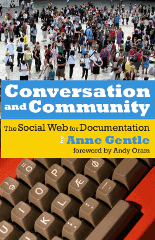
Conversation and Community book cover imageConversation and Community: The Social Web for Documentation (XML Press, ISBN: 9780982219119) by Anne Gentle provides technical communicators with a roadmap for integrating social media — blogs, wikis, and much more — into their content development efforts. This is critical because, as Anne notes in the preface, “professional writers now have the tools to collaborate with their audience easily for the first time in history.”
Anne provides overviews of all the major social media concepts — from aggregation to syndication, wikis, discussion, presence, and much more. But it is Chapter 3, “Defining a Writer’s Role with the Social Web,” that will make this book a classic. Here, Anne lays out a detailed strategy for determining whether and how to introduce social media in an organization. Consider this:

It’s important to find a balance between allowing an individual’s authentic voice to speak on behalf of an organization and the requirements of institutional messaging and brand preservation. […] It’s also possible that you are ahead of the curve and need to help others see ways to apply social technologies for the company.

She goes on to explain just how to accomplish these things.
Wikis and blogs each get a chapter of their own, in which Anne discusses how to start and maintain these types of environments.
After reading so much of Anne’s work on her blog, it’s a bit odd to see her writing on paper in an actual book. The feeling that I’ve wandered into the wrong medium is augmented by extensive footnotes, most of which point to web site resources, and the many examples of web-based content (such as videos or interactive mashups). However, it’s likely that the book’s target audience is more comfortable with paper.
Conversation and Community: The Social Web for Documentation provides an excellent introduction to wikis, blogs, forums, and numerous other social media technologies for the professional content creator. There is valuable (and perhaps career-preserving) information about how to develop a strategy for user-generated content that is compatible with your organization’s corporate culture.
If you think that community participation in your documentation is coming soon, read this book immediately. If you think that it’s not coming, you’re wrong, and you especially need to read this book.
Resources:
[Disclosure: I reviewed an early draft of this book. I have met Anne in person a few times and we have ongoing email and blog correspondence.]
Read More
Business case/ROI Structured content

In defense of English majors: we can understand business issues, too

In his latest blog entry, Neil Perlin explains how important it is for technical writers to have an understanding of business issues. With such knowledge, they can contribute to cost justifications for decisions that affect them directly. I couldn’t agree more with that. It is absolutely in writers’ best interests (and a matter of self-preservation) to understand processes and costs.

I strongly disagree, however, with the following assertion:

Writers from fine arts or English backgrounds can rarely discuss cost-justification in finance terms, so they have little input on buying decisions.

I am an English major, and I freely admit I am more of a “words” person than a “numbers” person. That being said, I am no slouch in the finance department. (Calculus is another matter, though.) I know many people with degrees in English and the liberal arts who are quite adept at understanding The Big Picture and developing business cases. Lumping all of us into a “can rarely discuss cost-justification” group is unfair.

Now I need to remind myself not to group software developers into a “can rarely write a coherent procedure” category. (It’s easy to make generalizations when you’re not the target of them.)

Read More
Localization

Lost in translation (and in my brain)

Last night, a bit of spam managed to worm its way through the filters on a personal email account, and I have to admit I glanced at the content while scanning previews of messages. That’s when I spotted a paragraph that really jumped out at me:

They have good management systems, product quality inspection system. And international speedboat (EMS) is the door – door accurate! Soon!

My thought process was, What’s up with the international speedboats? And why are emergency medical services (EMS) using these speedboats? I knew that the person who wrote the content was likely not a native English speaker, but I could not figure out what the writer was trying to communicate.

This morning, I finally realized what the message was trying to say: the company uses EMS worldwide delivery services for prompt and accurate delivery to my door. My brain must not have been firing on all cylinders last night when I thought EMS meant “emergency medical services.”

I don’t think I’ve ever spent as much time thinking about a company’s marketing message, but my thoughts weren’t about using the company’s services–I was merely trying to comprehend the message itself. That’s not what the company intended, I’m sure.

Marketing for a global audience–particularly one that associates EMS with “emergency medical services”–is not an easy thing!

Read More
Content management

Error message melodrama

The Shanghai Tech Writer blog has posted a screen capture of a rather ominous error message in FrameMaker:

The licensing subsystem has failed catastrophically. You must reinstall or call customer support.

I have never been the unfortunate recipient of that particular message in the many years I’ve worked with FrameMaker. If I did encounter that message, I would fully expect it to be accompanied by the shrieking strings from the Psycho shower scene. The use of “catastrophically” is a bit over the top. The fact I need to reinstall or contact customer support sets the tone enough, thank you very much–no soundtrack or scary adverb required.

The editor in me wants “catastrophically” removed from that message. If that bit of text came across my desk for review, I would have pushed back hard on the use of that word. It’s bad enough the user has to get a solution to the error, and referring to the problem as “catastrophic” is certainly not doing the user any favors.

Read More
Structured content

Authoring tools do matter

“I can write in anything.”
“The tool doesn’t matter.”
“I can learn any new tool.”

Most of the time, I agree. But then, there are the exceptions.

One of our customers is using FrameMaker to produce content that is delivered in HTML. (They use structured FrameMaker, generate XML, and then transform via XSLT into HTML.) Their rationale for using FrameMaker was:

  • The project was on an extreme deadline.
  • The writers already knew FrameMaker.
  • FrameMaker is already installed on the writers’ systems.

All valid points.

But.

We have had a continuous stream of requests from the writers to make adjustments to the FrameMaker formatting. Things like “the bullets seem a little too far from the text; can you move them over?”

FrameMaker is being used as an authoring tool only. FrameMaker formatting is discarded on export; HTML formatting is controlled mainly by CSS. However, even after repeated explanations, we continue to receive requests to modify the FrameMaker formatting.

In this specific case, the authoring tool does matter. Writers are focusing on the wrong set of issues (leading, kerning, print formatting), none of which is actually relevant for the output.

Why are they focused on this stuff? Because they can. It seems to me that moving authors to a WYSIOO (what you see is one option) tool, such as oXygen or XMetaL, instead of a WYSIWYG tool (FrameMaker) would eliminate the obsession with irrelevant formatting.

Read More
Webinar

Summer webinar theme: Avoiding extinction

Ellis Pratt of Cherryleaf is delivering Beyond Documentation this Thursday, July 9th, at 11 a.m. Eastern (US) time. Ellis gave a similar presentation in Vienna, which was the basis for Tom Johnson’s post, How to Avoid Extinction as a Technical Communicator, and led to a lively discussion in the comments. Join us to see if you agree with Ellis’s point of view.

In the category of “what’s old is new again,” we have Writing to STOP from Tony Self of HyperWrite in Australia.

STOP – Sequential Thematic Organisation of Publications – was developed at Hughes Corporation in the 1960s. The purpose of STOP was to improve the speed of document production, and to allow multiple authors to work simultaneously on the same document. […]
The STOP approach still resonates in the age of online documentation, as we still have the same needs to reduce document creation times and to work collaboratively. In this session, we will look at how the STOP approach worked, and how it might be re-applied even more effectively in the 21st century. 

That presentation is July 15 at 5 p.m. Eastern time. (Note the time change. Our usual 11 a.m. time slot is 1 a.m. in Melbourne, Australia. That seemed impolite to our presenter.)

Finally, Jack Molisani of Prospring and Lavacon is delivering How to Build a Business Case on August 4 at 11 a.m. Eastern time.

If you’ve ever submitted a purchase request that was not approved, chances are it lacked one or more of the vital components management looks for when allocating resources. 

In this segment, Jack Molisani will present a fun and practical session identifying the components of a successful business case, how to identify what is important to management, how to maximize your chances of approval, and more.

Jack usually rewards questions with chocolate, and I’m going to be impressed if he manages that in a webinar.

Don’t miss your chance to hear from these guys. You can register through our store; recordings of previous webcasts are now available as well.

PS Our presenters are based in England, California, and Australia. Registrants could be anywhere. The sessions are yours for $20. I love the Internet.

Read More
Structured content

This is the future of technical communication

First, read this article in the New York Times about the struggle to keep a reporter’s kidnapping quiet:

For seven months, The New York Times managed to keep out of the news the fact that one of its reporters, David Rohde, had been kidnapped by the Taliban. But that was pretty straightforward compared with keeping it off Wikipedia. 

Now, think about these issues as applied to technical communication. Let’s assume that your organization has online community — forums and a wiki, maybe. Technical communicators are responsible for monitoring and managing the community. Under what circumstances do you delete information? How do you respond when:

  • Information is inaccurate
  • Information is unflattering
  • Both

What if the information is accurate but incomplete?
What if someone describes a way of using your product that could cause injury, even though it’s technically possible? Do you delete the information? Do you add a comment warning of possible injury? What if the reader sees the original post but not the comment?

In the absence of safety concerns, I think that accuracy must win. Thus, as the information curator, you have a responsibility to correct inaccurate information. If the inaccuracy is truly dangerous, you may need to edit the post directly. Make sure that you disclosure what you’ve done with brackets. For example:

I like riding my scooter down mountains, especially without guardrails. Wheee! [This is a really bad idea because You Might Die. -moderator]

or

I like [really bad idea redacted by moderator]. Wheee!

Deleting unflattering (but accurate) information will probably backfire on the organization. Instead of censoring negative content, try addressing the concern being identified. Think of an impolite forum post as customer feedback. Does the poster have a valid point? Can you fix the problem that’s been identified?

I hate your scooters. They don’t come in enough colors. And they suck. 

What colors would you like to see? We do have two dozen available, see this list.
– Joe in TechComm

The life-or-death issues around Mr. Rohde’s kidnapping are relatively straightforward. We are likely to have much more difficult judgment calls in typical technical communication. Imagine, for example, that information were being suppressed because it criticized security arrangements and not because of safety concerns for the reporter. In that case, I think we can agree that Wikipedia’s response would have (and should have) been different. What would an equivalent scenario look like in your organization?


Read More