LearningDITA: replatforming structured learning content
For nine years, the Scriptorium site LearningDITA.com served more than 16,000 students seeking knowledge about the Darwin Information Typing Architecture (DITA) XML standard. A critical system failure forced Scriptorium to rebuild the site, so we focused our consulting expertise on ourselves to address a replatforming challenge for structured learning content.
Starting with a single source of truth
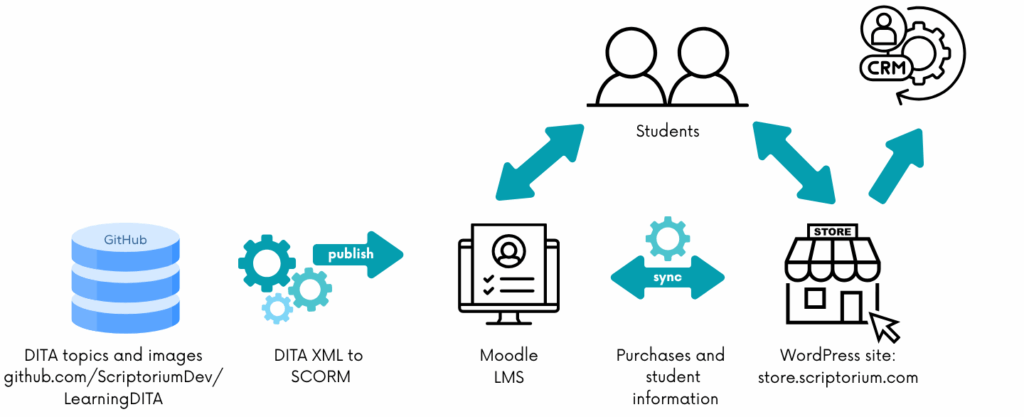
The Scriptorium team built the original LearningDITA site on a single source of truth—DITA XML files. We developed a publishing pipeline to transform the DITA XML source into WordPress XML ingested by a WordPress-based learning management system (LMS).
The process allowed us to practice what we preach: structured content enables single-source publishing.

In addition to providing the interactive learning experience to students, the WordPress LMS connected to our customer relationship management (CRM) system. The data about course registrations helped us understand how the training site fostered and supported client relationships.
Starting in late 2024, the platform began to exhibit persistent issues with quiz grading, leading to a breakdown in the student’s learning journey. After extensive, unsuccessful troubleshooting, we made the strategic decision to embark on a complete replatforming effort.
The investigative phase: defining requirements
Recognizing the situation as a content operations problem, we turned our consulting expertise inward. The first step was establishing rigorous requirements to prevent technical debt and ensure the new solution supported future growth and organizational goals.
The primary technical requirement was non-negotiable: maintain the DITA XML as the single source of truth with zero manual copy-and-paste during migration. This meant an automated pipeline to transform the DITA XML files to the new platform’s ingestion format. We also wanted to improve the user experience (UX) beyond the old, page-based WordPress paradigm and build a robust platform to handle thousands of users and an expanding content catalog.
Beyond technical specs
The requirements gathering went beyond purely technical needs to include commercial and organizational issues. The team needed flexible ecommerce to handle complex US state tax tracking for elearning sales, and, critically, the ability to sell non-LMS items like consulting packages and books. These requirements pointed to a storefront separate from the LMS.
The new platform had to incorporate Scriptorium branding (logos, colors, and so on)—a marketing requirement that the original generic LearningDITA brand did not satisfy. Finally, the solution needed to align with and enhance our team’s existing expertise, ensuring that any new skills gained would be directly applicable to client work.
Selecting the new stack
During the LMS evaluation phase, the team created a scoring matrix for attributes like open-source vs. commercial status, support for content ingestion standards, and external authoring capability.
We considered two primary content standards for the publishing pipeline: Shareable Content Object Reference Model (SCORM) and the newer, more complex Experience API (xAPI). Given our focus on self-paced learning materials, we decided on a DITA-to-SCORM publishing pipeline. We didn’t need xAPI’s extended experience-tracking capabilities.
Moodle: the open-source LMS choice
For the LMS, Scriptorium selected Moodle, an open-source solution. As vendor-agnostic consultants, we prefer to use open-source solutions when possible for our own (minimal) publishing needs. Additionally, we have a strong technical team, which makes the configuration required by an open-source solution feasible.
The Moodle instance is hosted on a Virtual Private Server (VPS), so we can adjust memory and processing power as the user base expands.
The hybrid solution
To address the ecommerce requirements, we adopted a hybrid architecture. Moodle’s ecommerce support didn’t meet our requirements, particularly tax tracking, credit card processing, and support for varied product sales. So instead, the team built a WordPress-based store alongside the Moodle LMS.
A dedicated WordPress plugin synchronizes account information and course completion status between the WordPress store and the Moodle learning environment. This setup successfully met the requirements for flexible product sales (training access, books, consulting packages) and simplified tax compliance. Additionally, we were able to connect to our CRM system.
Building the automated pipeline
The true engineering challenge lay in creating the new DITA-to-SCORM transformation. Scriptorium built the SCORM publishing pipeline using the DITA Open Toolkit (DITA-OT) as a foundation. The publishing process compiles the DITA content and its built-in semantics—such as correct assessment responses and specific feedback for incorrect answers—and folds the information into components of the SCORM package that create lessons and the interactive quizzes.
Post-migration enhancements
Following the migration and the successful deployment of the core DITA-to-SCORM pipeline, we focused on addressing the aesthetic shortcomings of the initial out-of-the-box SCORM output. The early version lacked visual appeal and clear hierarchy. Our consultants refined the CSS within the SCORM package to introduce Scriptorium corporate colors, improve line spacing, and visually group assessment elements. We also enhanced the JavaScript for dynamic quiz interactions, such as a more engaging drag-and-drop experience for matching questions, resulting in an improved user experience while ensuring Scriptorium branding was front and center.
Key lessons in content operations
The LearningDITA replatforming offers three major takeaways for any organization facing technology or process change:
- Have a consultant mindset. Always develop detailed requirements before selecting tools. Allowing requirements to drive tool selection prevents costly retrofitting.
- Consider the political and organizational realities. Scriptorium avoided a copy-and-paste shortcut because it would have been impossible to maintain—and such a solution would have undermined our credibility as content operations consultants.
- Reject silos and design systems that scale and integrate with other business functions. The new platform supports marketing and sales via the CRM, and the system can adapt to unforeseen product lines and future growth.
To learn more and see demos of both LearningDITA sites, watch this recorded presentation:
Questions for Alan? Reach out via our contact form!
"*" indicates required fields
About the author